What can diagnostics do for a brand Solaris?
The Solaris diagnostic tool from DevCom offers basic functions such as reading and clearing faults, as well as several advanced functions listed below.
-
Parameter reading and logging
-
DPF service and regeneration
-
Injector coding
-
Other advanced features
All this for a total of 1 vehicle models. The latest version of diagnostics for this brand is from 2018 (version Solaris / SOR v2).
Supported models
Our diagnostics are compatible with selected models of the Solaris brand. Supported models include various years and variants. Please contact us to verify compatibility with your vehicle. An overview of supported models can be found below.
-
Urbino 8,9 LE
Our diagnostics for the brand Solaris
Our diagnostic solutions for Solaris vehicles allow you to choose exactly what you need. We offer the powerful TSPro 10 standalone diagnostic tool, the professional Troodon OBD Pro diagnostic interface, or the simpler Troodon OBD Basic, which is also ideal for home use. Troodon diagnostic tools can be connected to any PC or controlled from your mobile phone. All our diagnostic tools are developed and manufactured in Prague, in the heart of Europe.
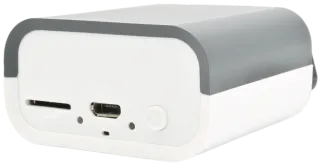
Troodon OBD Pro Diagnostics + software TRUCK/TRAILER/BUS One
19 340 CZK excl. VAT
- A professional diagnostic interface that can be expanded with additional vehicle brands
- Support for SGW and DoIP
- Support for older vehicles
- Fast and seamless diagnostics directly from your PC or mobile device
Troodon OBD Pro Diagnostics + software BUS Multibrand
30 070 CZK excl. VAT
- A universal interface supporting all major bus brands
- Support for SGW and DoIP
- Support for older vehicles
- Fast and seamless diagnostics directly from your PC or mobile device
- Expansion option for other vehicle types
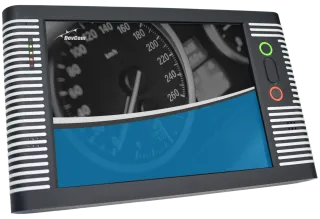
TSPro 10 diagnostics + software TRUCK/TRAILER/BUS One
47 400 CZK excl. VAT
- A standalone diagnostic solution that can be expanded with additional vehicle brands
- Support for SGW and DoIP
- Support for older vehicles
- The ideal solution for larger workshops
TSPro 10 diagnostics + software BUS Multibrand
58 130 CZK excl. VAT
- Standalone diagnostics for all bus brands
- Support for SGW and DoIP
- Support for older vehicles
- Expansion option for other vehicle types
- The ideal solution for larger workshops
Diagnostic functions for the brand Solaris
Our diagnostic tools offer a wide range of functions for accurate analysis and service. For the Solaris brand, both basic functions such as reading and clearing fault codes and several advanced functions listed below are available.
Parameter reading and logging
Daily bread in diagnosing vehicle faults. Review all sensor and control unit data and record changes to easily identify the causes of vehicle faults. Of course, all records can be stored for further analysis.
DPF service and regeneration
Ensure optimum DPF function! Our diagnostics allow active and forced regeneration of the DPF, monitoring of its condition and possible adaptation after replacement, which helps to prevent clogging problems.
Injector coding
Injectors are among the most critical components of any engine. For proper engine operation, it is necessary to write their calibration code (IMA) into the engine control unit after replacement. Without correct coding, the engine may run irregularly or the vehicle may not start at all.
Other advanced features
Supported ECUs for the brand Solaris
The DevCom diagnostic tool for the Solaris brand provides connection to a wide range of control units in the vehicle. A selection of the most important ones is listed below.
The engine control unit is a key component for the proper operation of the internal combustion engine. It manages combustion processes, ensures optimal performance, and maintains compliance with emission standards. The ECU responds to driver inputs and current operating conditions through numerous sensors and actuators.
Using diagnostics, it is possible to read and clear fault codes, monitor live data (e.g. fuel pressure, temperatures, engine speed), perform actuator tests (injectors, ignition coils, EGR), initiate diesel particulate filter regeneration, or carry out adaptations after component replacement.
This control unit manages the vehicle’s braking safety systems such as ABS, stability control (ESP), and hill-hold functions. It monitors the condition of individual wheels, braking system activity, and stability interventions during driving.
Diagnostics allow reading of fault codes, viewing sensor data (wheel speed, brake system pressure, pedal position), performing actuator tests, carrying out guided bleeding procedures, and other related functions.
The Body Control Module manages the vehicle’s comfort and auxiliary functions such as lighting, wipers, locking, turn signals, alarm, and remote control. It acts as a central hub for numerous sensors and switches.
Diagnostics allow configuration of functions (e.g. automatic wipers, coming/leaving home), testing of output signals (e.g. relay activation), reading sensor data, coding of new components, and real-time monitoring of input and output states.
This unit manages the operation of automatic or automated transmissions. It determines when and how to shift, how to control the clutch, and the hydraulic system pressure. It responds to engine load, driving style, and driver inputs.
Diagnostics offer data reading (e.g. oil temperature, clutch status, pressure), shift adaptations, value resets after transmission replacement, testing of solenoid valves and sensors, and other functions.
The instrument cluster displays essential operational information such as speed, engine RPM, fuel level, fault messages, and service intervals. It is often connected to the vehicle’s central network and serves as the user interface.
Diagnostics allow testing of needles and displays, setting service intervals, configuring displayed information, coding after unit replacement, and reading faults related to the display or communication with other control units.
Each door may have a separate control unit that manages windows, locks, mirrors, lighting, and is linked to functions such as keyless entry or child lock.
Diagnostics allow testing of motor functions, button controls, lock feedback, reading the status of limit switches, and configuring comfort features (e.g. window auto-close when locking).
Do you have a question, want to see a demo, or place an order right away?
We will be happy to advise you, assist you, and, if necessary, demonstrate diagnostics in action. Simply fill out and submit the form below.
Required connection cables for diagnostics Devcom for the brand Solaris
- TS02/056 OBD MUX cable